Plan photos in Guided Start, and two plans per row on phones
November 17, 2026
Choosing a box size is the first decision a new customer makes. A photo of each box helps them choose, and on a phone a long list of sizes no longer fills screen after screen.
Photos on plan options
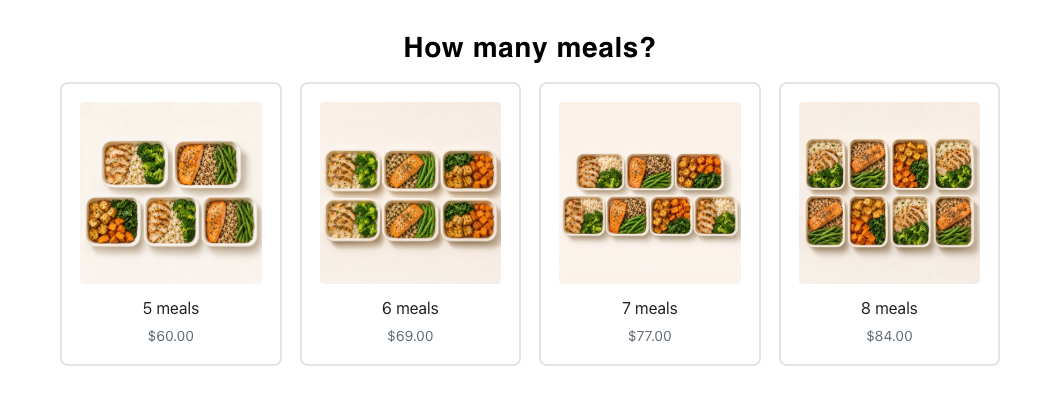
Add an image to each variant of your meal plan product in Shopify. Then open Guided start, open the plan question (for example How many meals?) and turn on Show variant images. Each option shows its variant's photo above the label, cropped to a square so every card is the same size.
An option whose variant has no photo shows an empty tile of the same size, so the row stays lined up. With two plan options, such as size and servings, an option uses the photo of the first variant (in Shopify's variant order) that has it.
Prices and photos stay in step with Shopify
When you change the price or the photo of a meal plan variant in Shopify, Servd picks it up on its own: Guided Start, the menu page and a customer's plan change use the new price. Before, Servd kept the price from when you connected the product until you selected it again in Meal plans.
A variant you add in Shopify still needs the product selected again in Meal plans, so you can set its Meals per box.
Two per row on phones
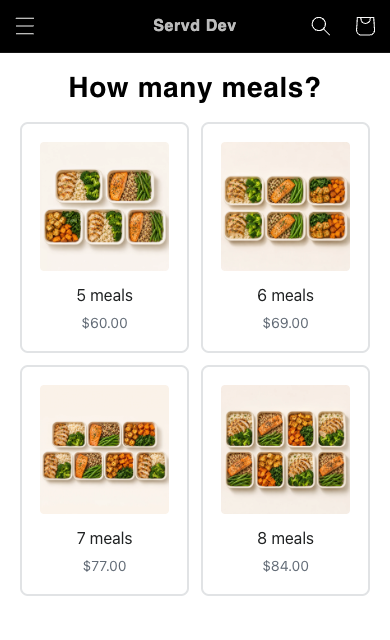
On a phone, a plan question with more than three options, which is usually How many meals?, now shows two options per row. Plan questions with two or three options and the other questions keep one per row, so longer descriptions stay easy to read. Computers and tablets are unchanged.
More product updates
Copy your menu link from Meal plansStorefront · November 16, 2026Show your weekly menu anywhere in your themeMenus · November 13, 2026Show customers their box as they pickStorefront · November 12, 2026Ready to set this up on your store?
Servd is free to install and walks you through creating your meal plan, your first menu, and the storefront entry point.
Install Servd on ShopifyQuestions about your setup? Email us — we respond within 24 hours.