Copy your menu link from Meal plans
November 16, 2026
Two setup questions came up again and again: which link customers should use to start ordering, and why checkout failed on a store that looked ready. Meal plans now answers both.
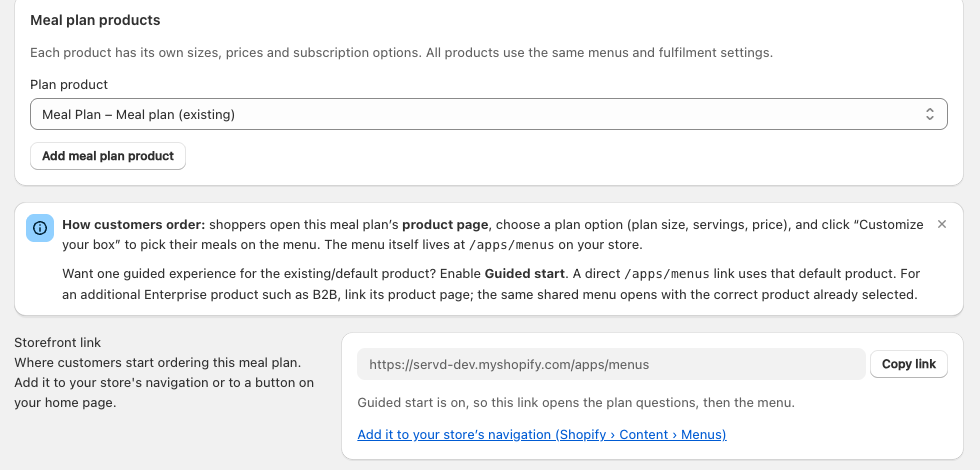
The link to add to your navigation
Open Meal plans, choose a meal plan and click Copy link under Storefront link. Paste it into a menu item in Shopify under Content › Menus, for example your Main menu.
With Guided start on, the link opens your menu page at /apps/menus; an additional meal plan product's link also opens that product's plans. With Guided start off, it is the meal plan's product page, where customers pick a plan before choosing meals.
A warning before checkout fails
Customers can open the menu while the meal plan product is a draft or missing from the Online Store sales channel, but checkout fails. Meal plans and Getting Started now say so. Set the product to Active, add Online Store under Publishing, then click Check again on the warning.
More product updates
Plan photos in Guided Start, and two plans per row on phonesStorefront · November 17, 2026Show your weekly menu anywhere in your themeMenus · November 13, 2026Show customers their box as they pickStorefront · November 12, 2026Ready to set this up on your store?
Servd is free to install and walks you through creating your meal plan, your first menu, and the storefront entry point.
Install Servd on ShopifyQuestions about your setup? Email us — we respond within 24 hours.