Show customers their box as they pick
November 12, 2026
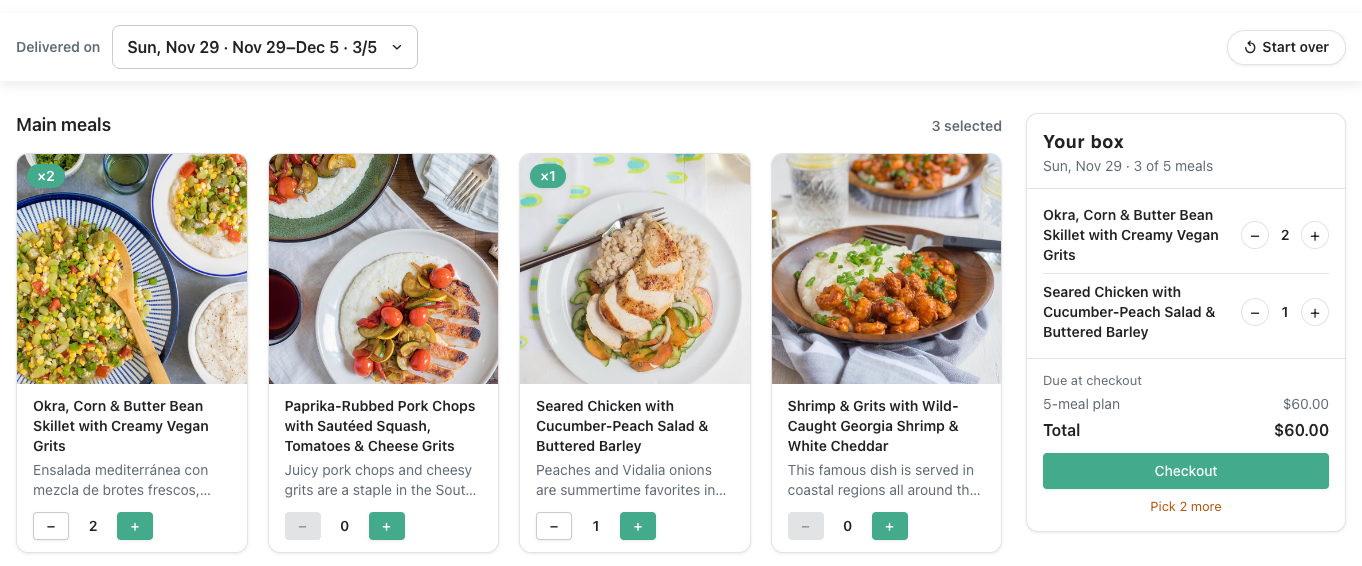
With a long menu, customers lost track of what they had already picked and what it would cost. The Your box panel keeps their choices and the total in view while they choose.
What customers see
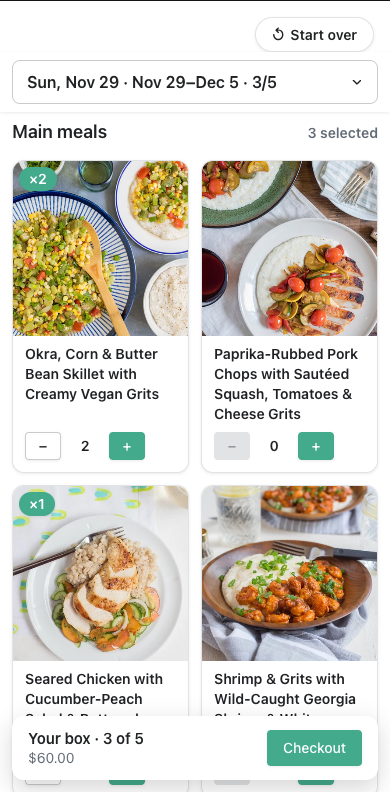
On a computer, a Your box panel sits beside the menu. On phones and tablets, a bar at the bottom of the screen shows how many meals are chosen and the total; tapping it pulls the same panel up.
The panel lists the chosen meals with buttons to add or remove one, the plan price, any paid extras and Premium upgrades, the total and the checkout button. The prices are what the customer pays at checkout. For a subscription that is the first week's box, so on a later week the panel names the week its prices are for.
It replaces the checkout bar above the menu, so the page has one checkout button. It is not your Shopify cart: nothing goes into the cart until the customer checks out.
Turn it on
On the Design page, turn on Show the customer's box as they pick, and switch the preview between Computer and Phone to see it before you save. It shows to customers buying a plan; subscribers editing a week from their portal see the page as before.
More product updates
Plan photos in Guided Start, and two plans per row on phonesStorefront · November 17, 2026Copy your menu link from Meal plansStorefront · November 16, 2026Show your weekly menu anywhere in your themeMenus · November 13, 2026Ready to set this up on your store?
Servd is free to install and walks you through creating your meal plan, your first menu, and the storefront entry point.
Install Servd on ShopifyQuestions about your setup? Email us — we respond within 24 hours.