Orders page
June 15, 2026
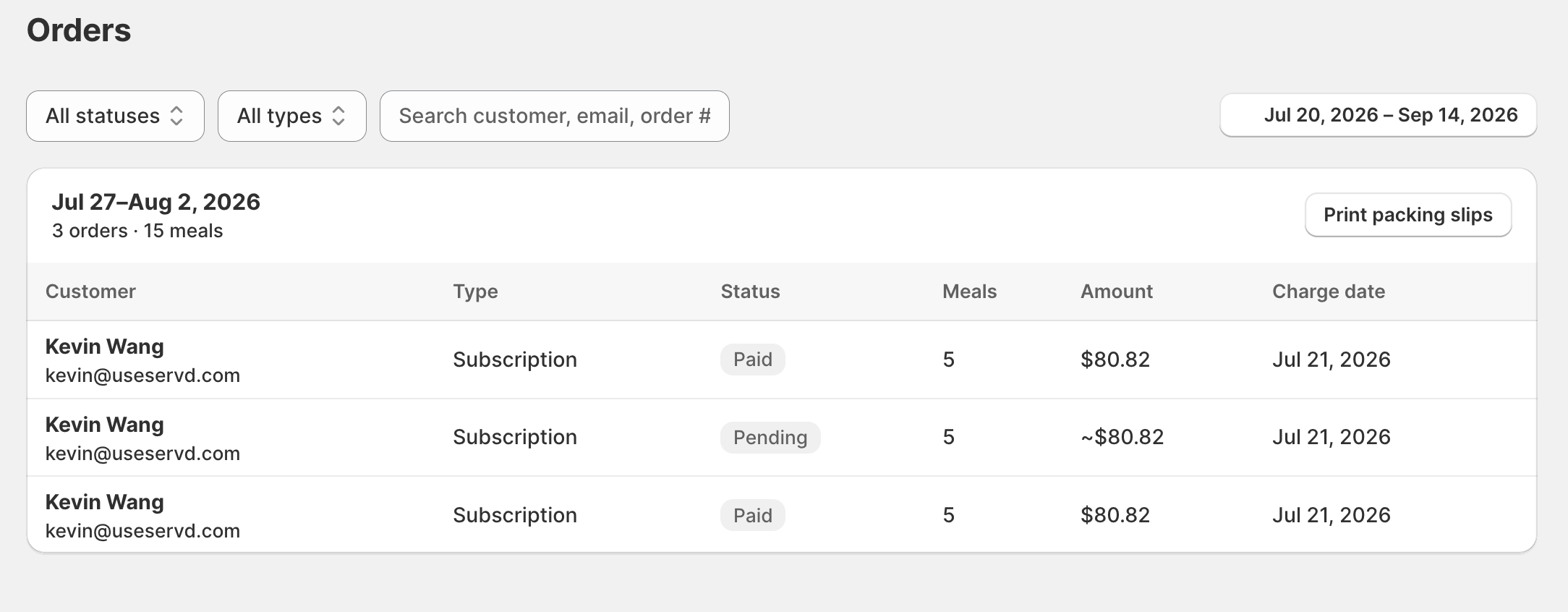
The Orders page brings upcoming deliveries together in one view — what's shipping, when each is charged, and for how much — so you're not reconstructing your delivery schedule from individual subscriptions.
What it is
Orders is a delivery-centric view of what's coming up: each upcoming order with its delivery, charge date and amount. It covers both subscription renewals and one-time orders, giving you a single schedule of everything the kitchen and billing need to expect.
Why it matters
Subscriptions answer 'who are my customers'; Orders answers 'what am I making and shipping this week'. Having deliveries, dates and amounts on one screen is what lets you plan a week without cross-referencing every subscriber.
Where to find it
Open the Orders tab. Amounts and charge dates are shown per order, including for one-time and pending orders.
More product updates
Show your menu and customer portal in French, Spanish or KoreanStorefront · October 20, 2026A cutoff for each delivery or pickup dayDelivery · October 18, 2026Set your delivery schedule during setupDelivery · October 17, 2026Ready to set this up on your store?
Servd is free to install and walks you through creating your meal plan, your first menu, and the storefront entry point.
Install Servd on ShopifyQuestions about your setup? Email us — we respond within 24 hours.