Menu slots with auto-assign
June 18, 2026
Menu slots let the app fill in a subscriber's selections automatically when they don't pick for themselves. Customers who forget to choose still receive a complete, sensible box instead of an empty or failed order.
What it is
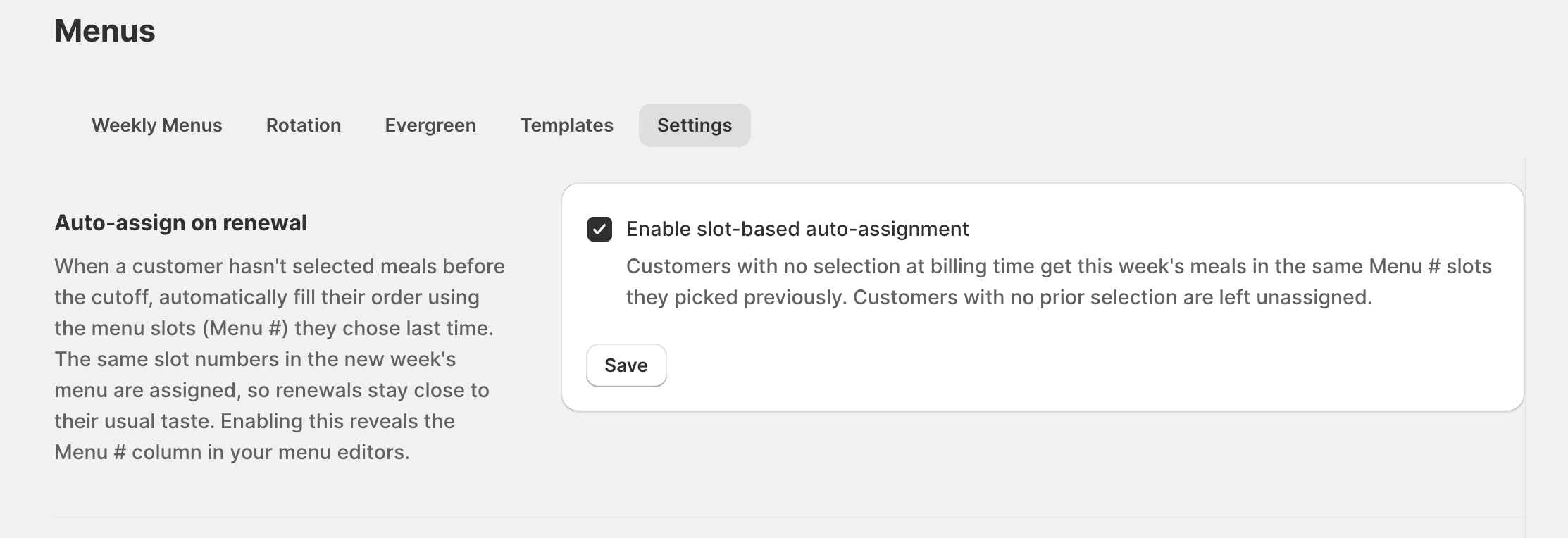
A menu slot is a position in a customer's box that can be auto-assigned from the week's menu. When a subscriber reaches the cutoff without completing their selection, the app fills their open slots so the delivery goes out full. Auto-assign is opt-in per merchant and lives in the menu tabs when enabled.
Why it matters
A meaningful share of subscribers never actively choose each week. Without auto-assign, that's a support ticket or a missed delivery; with it, those customers get a complete box automatically and you keep the revenue and the relationship.
How to set it up
Turn on the slots feature in your menu settings. Once enabled, the slot controls appear in the menu tabs, and unfilled selections are auto-assigned from the week's menu at cutoff.
More product updates
Show your menu and customer portal in French, Spanish or KoreanStorefront · October 20, 2026A cutoff for each delivery or pickup dayDelivery · October 18, 2026Set your delivery schedule during setupDelivery · October 17, 2026Ready to set this up on your store?
Servd is free to install and walks you through creating your meal plan, your first menu, and the storefront entry point.
Install Servd on ShopifyQuestions about your setup? Email us — we respond within 24 hours.